Most point-of-sale conversations stop at the counter. Does the terminal take a tap? Does it print a receipt? Does it sync at close? Those are table stakes. The harder question, and the one that separates an operator who reacts from an operator who anticipates, is what the system does with everything it already knows.
A POS analytics dashboard is a reporting interface inside a point-of-sale environment that turns transaction activity into views an owner or operations leader can act on: sales by daypart, product and category performance, location comparisons, refund and void patterns, payment-method mix, and customer purchase history where consent permits. It sits between the sales floor and the back office, and when designed well, it answers questions before someone has to dig through a spreadsheet.
This piece walks through what real-time payment reporting actually changes about the action window, what detailed payment reporting reveals about customer behavior, how customer management payments data supports repeat business without overstepping privacy expectations, and why built-in invoicing matters more to recordkeeping than most merchants realize. Every claim here is sourced.
TL;DR
- U.S. retail e-commerce hit US$1.2337 trillion in 2025, or 16.4% of total retail sales, which means POS reporting that treats online activity as a separate ledger is already reporting on an incomplete business.
- Digital payments made up 86% of Canadian payment volume and 77% of payment value in 2024, so payment-method mix belongs on the operational dashboard, not buried in a monthly finance export.
- Average transaction size varied sharply by method in 2024: $45 debit, $105 credit, $29 contactless, $383 online transfers, making method mix a behavioral signal rather than a back-office curiosity.
- Twenty percent of Canadian businesses reported experiencing payment fraud over a six-month period, which is why exception views on refunds, voids, and overrides earn their place on a daily report.
- Deloitte’s 2024 survey of more than 9,800 consumers found 86% rated simplicity and ease of use as important loyalty attributes, and only 60% were satisfied with current personalized experiences.
Why should a POS be treated as an intelligence layer rather than a checkout device?
A POS should be treated as an intelligence layer because the transaction record it already generates contains nearly everything an operator needs to manage assortment, staffing, channel performance, and exception risk, and because that data loses most of its value if it only surfaces after the month closes. The checkout function collects the data. The reporting function is the payoff.
Consider the scale of what it collects. Payments Canada’s payment trends release analyzed 22.5 billion retail payment transactions made in Canada in 2024, totaling $12.2 trillion. Each transaction carried a timestamp, an amount, a method, a location, and, in many cases, an item-level breakdown. That is an enormous behavioral dataset merchants generate, whether or not they read it.
The framing shift matters for how you evaluate systems. A checkout-first POS gets judged on speed and uptime. An intelligence-first POS gets judged on whether a manager can move from a headline number into the transaction that caused it in under a minute. Those are different product requirements, and they produce different daily habits inside a business.
Supporting evidence suggests operators already understand this. Statistics Canada’s business AI analysis found that 28.3% of businesses reported technology adoption and innovation improved their operating efficiency over the preceding 12 months, the leading cited driver. Technology adoption is doing real work on the operations side, but only when the outputs are usable.
Here is the practical test. An owner should be able to answer eight questions from the dashboard on any given morning: what is selling now, what is selling less than expected, which dayparts or locations or channels need attention, which payment methods customers are using, what exceptions require review today, which customers are engaging repeatedly where consent permits that analysis, which invoices remain open or credited, and whether finance can trace any reported number back to a transaction-level record. If the system cannot support those eight questions, it is a cash register with a screen.
That framing also reshapes who the software is built for. A POS designed only for the person at the counter optimizes for transaction speed. A POS designed for the business owner optimizes for both, and treats reporting as a first-class surface instead of an export button. This is central to how we think about the POS analytics dashboard experience at Yuzera: it should serve the person running the business, not just the person ringing the sale.
What does the omnichannel reality mean for unified POS reporting?
The omnichannel reality means that separating in-store and online sales into different reporting systems produces a structurally incomplete picture of the business, because a meaningful share of North American retail demand now moves through digital channels that share customers, inventory, and returns with the physical floor.
The U.S. numbers are unambiguous. The U.S. Census Bureau’s quarterly e-commerce release estimated full-year 2025 retail e-commerce sales at US$1.2337 trillion, up 5.4% from 2024, representing 16.4% of total U.S. retail sales. In the fourth quarter alone, seasonally adjusted e-commerce sales reached US$316.1 billion, or 16.6% of total retail sales for the quarter. Roughly one dollar in six.
Canada’s mix is different but moving in the same direction. Statistics Canada’s retail trade release reported that Canadian retailers finished 2025 with $837.2 billion in sales, up 4.0% from 2024. Seasonally adjusted retail e-commerce sales rose 3.6% to $4.3 billion in December 2025, accounting for 6.1% of total retail trade, up from 5.8% in November. Payments Canada put Canadian e-commerce transactions at $77 billion in 2024, representing 6% of retail sales.
The percentage gap between the two countries matters less than the operational implication. In both markets, a customer who buys online and returns in store creates a record that must reconcile across two systems. If those systems don’t share a customer identifier, an inventory position, or a transaction reference, reconciliation becomes manual. Manual reconciliation is where margin and accuracy quietly leak.
Unified reporting also gives you external benchmarks. Statistics Canada maintains a monthly retail e-commerce table covering Canada, provinces and territories, census metropolitan areas, and industry categories. A merchant with clean channel-level reporting can compare its own directional movement against geography- and sector-level trends, which converts an internal number into a competitive read. Was that soft December a store problem or a category problem? Without channel and category detail on your side, you cannot tell.
For multi-location and multi-channel merchants seeking a payment gateway with analytics dashboard features, the design requirement is straightforward to state and harder to execute: one transaction model, many surfaces. Face-to-face, mobile selling, order-ahead, invoiced sales, and e-commerce should all land in the same ledger with the same field definitions. Everything downstream, from payment-method mix to customer segmentation, depends on that. This is the kind of orchestration challenge Yuzera’s omni-solutions approach is built to address, pulling channels into one reporting layer instead of several disconnected ones.
What should a real-time POS analytics dashboard actually reveal?
A real-time POS analytics dashboard should reveal what a manager can still act on today: transaction velocity against expectation, refund and void activity, discount and override frequency, payment-method shifts, item or category movement outside the normal range, and open high-value invoices requiring follow-up.This kind of real-time payment reporting earns its name only when it changes the action window.
This is the distinction most dashboard conversations miss. A live tile showing today’s gross sales is decorative if the only response it triggers is satisfaction. A live tile showing that transaction count at one location has dropped 40% against the same hour last week, during normal operating hours, is operational. It prompts a phone call. The first is a number. The second is a signal.
Useful real-time views tend to cluster around six patterns. A sudden surge in refunds, voids, or manager overrides. A drop in transaction count at a location during trading hours. An unexpected rise in a particular payment-method mix. An operational bottleneck affecting a store, lane, order type, or channel. A product or category moving materially faster or slower than expected. A high-value order or invoice workflow that needs human follow-up. Each has a response attached, which is the test.
Payments Canada’s framing supports the pattern-based approach. In its description of the future of real-time payments, Payments Canada characterizes real-time risk monitoring as a capability that continuously analyzes transactions using current and historical data to detect and prevent fraud. The operative word is continuously, and the operative method is comparison against history. A single transaction rarely tells you anything. A transaction against a baseline tells you a lot.
Experienced operators will recognize a discipline point here. Real-time dashboards degrade quickly when you treat everything as an exception. If a manager gets twelve alerts a day, they will ignore all twelve by week two. Set thresholds deliberately, review them quarterly, and tighten or loosen them based on how many alerts actually prompted action. A well-tuned exception view produces few alerts and near-total response rates.
Real-time payment reporting also has a quieter benefit: it shortens the distance between a problem and the person who can fix it. With a payment processor real-time reporting setup, when a store manager sees void counts climbing on one register mid-shift, the conversation happens the same day, not during a month-end variance review three weeks later, when nobody remembers the context. That is the entire argument for real-time, compressed into one sentence.
Which reporting cadence matters for which decision?
Reporting cadence matters because different business decisions have different response windows, and forcing every question into one daily report either overwhelms the reader or delays the response. Real-time views serve exceptions, daily views serve close-out and accountability, weekly views serve staffing and product decisions, and monthly or quarterly views serve strategy, finance, and governance.
In-the-moment reporting answers questions like whether transactions are unexpectedly dropping or whether voids are suddenly rising. The right output is an alert or an exception tile, not a full report. Nobody reads a twelve-page PDF in the middle of a shift. The design goal is a single glance that either says nothing needs you or points at one thing.
Daily reporting is where close-out and team accountability live. The questions are concrete: what were today’s sales, refunds, invoice changes, and payment-method patterns? The output is a daily summary paired with an exception report. This is also where staff-level accountability becomes constructive rather than punitive, because patterns are visible early enough to coach rather than discipline.
Weekly reporting is for trend and resourcing. Which categories, locations, dayparts, or customer segments changed? A comparative trend report, week over week and against the same week last year, is the right artifact. Staffing schedules, reorder quantities, and promotional timing all get decided at this cadence in most operations.
Monthly and quarterly reporting is strategic and governance-oriented. Is channel mix changing? Is retention moving? Is payment behavior shifting? The output is a management review pack plus retained records, and those retained records matter for reasons that go beyond management interest, as the recordkeeping section below covers.
A sequencing argument is buried in all of this. Statistics Canada’s business conditions report found that 10.6% of businesses planned to use artificial intelligence over the next 12 months to produce goods or deliver services; among those planning to use AI, 26.7% identified data analytics as a planned application, while 19.4% identified marketing automation.
That is meaningful appetite. But predictive analytics built on inconsistent transaction records, duplicate customer profiles, and undefined terms produces confident nonsense. Clean data, documented definitions, and governed access come first. The cadence framework above builds that discipline into routine rather than treating it as a one-time project.
What can detailed reporting tell you about customer behavior?
This level of reporting can show how customers prefer to transact, what purchase size each method tends to carry, and where your mix is drifting, making payment-method breakdown an operational report rather than a finance footnote. The method a customer chooses is a behavioral disclosure.
The Canadian data makes the case cleanly. Payments Canada reported that digital payments represented 86% of total payment volume and 77% of total payment value in 2024. Contactless payments accounted for 58% of Canadian transactions, with 13 billion contactless transactions recorded, up 11% from 2023. Mobile contactless volume reached 3.4 billion transactions, up 28% from 2023, and 68% of Canadian smartphone owners made a payment using their smartphone during the six months.
Now overlay average transaction size, which is where the behavioral read gets sharp. Payments Canada’s payment data dashboard put 2024 average transaction size at $45 for debit, $105 for credit card, $29 for contactless, and $383 for online transfers. These differences reflect distinct customer behaviors across payment instruments. Contactless at $29 signals high-frequency, low-value visits. Online transfers at $383 signal considered, lower-frequency purchases. If your contactless share is climbing while your average transaction value falls, you are seeing a visit-frequency story, not a discount story, and the correct response is different.
Cash still belongs in the report. Payments Canada recorded 2.5 billion cash transactions in 2024, 11% of Canadian payment volume, and found that 57% of Canadians had no desire to go completely cashless. A merchant planning around cash disappearing is planning around something the data does not yet support, and a dashboard that omits cash makes that mistake invisible.
Granular payment data also feeds operational choices that have nothing to do with finance. Method mix by daypart informs lane and terminal configuration. Method mix by location informs hardware deployment across a fleet. Method mix by channel informs where checkout friction might be pushing customers toward or away from a path.
The recommendation is simple: pull payment-method mix out of the monthly reconciliation and put it on the operational dashboard, segmented by location, daypart, and channel. It is one of the few reports that is simultaneously a customer-behavior indicator, a fraud-exception input, and an infrastructure-planning input. Detailed payment reporting of this kind is exactly what a POS analytics dashboard should surface without requiring a custom export.
How do customer management features turn transactions into repeat business?
Using a payment gateway with customer management features turns transactions into repeat business by linking purchase history to a consented customer profile, which lets a merchant recognize returning buyers, understand purchase patterns, and make follow-up relevant instead of generic. Customer profile data is only valuable when it is accurate, permitted, and easy for staff to use at the counter.
The evidence on what customers want from these programs is clear and slightly humbling. Deloitte’s consumer loyalty survey covered more than 9,800 consumers across the United States, United Kingdom, India, and Brazil. It found that 86% of respondents rated financial rewards and simplicity or ease of use as important or very important loyalty-program attributes. Four out of five consumers valued flexibility when earning and redeeming rewards. That is a directional finding rather than a Canada-specific one, but the design lesson travels.
The gap is in execution. Deloitte found only 60% of consumers were satisfied with the customized and targeted experiences currently offered by loyalty programs. Meanwhile, three-quarters of Gen Z and millennial consumers said a high-quality digital experience is essential. Read those two findings together, and the conclusion is uncomfortable for many programs: personalization is expected, digital quality is expected, and roughly four in ten customers think the current attempt is not landing.
That argues for restraint rather than volume. A customer-management setup that captures three fields accurately and uses them well beats one that captures fifteen fields inconsistently. If a repeat customer walks in and staff can see their last three purchases and preferred format, that is usable. If staff have to scroll through a profile full of half-empty fields and duplicate records, they will stop looking.
Deloitte’s research also states that robust data governance and infrastructure are needed to create clean, usable customer data that supports personalization features. That is the unglamorous prerequisite. Duplicate profiles, inconsistent identifiers, and stale consent states are not marketing problems; they are data problems, and they show up as bad segments and awkward outreach.
The practical test for customer management payments functionality is whether a clerk can enroll a customer in under fifteen seconds without asking three questions, whether the consent state is visible on the profile, and whether purchase history appears at the point of service rather than only in a back-office report. Customers named ease of use as the key attribute. It also determines whether staff actually use the feature. Good customer management payments design turns this data into something staff reach for during a transaction, not something they avoid.
What privacy and consent controls belong around POS customer data?
Privacy and consent controls belong around POS customer data because collecting personal information creates legal obligations, and because a customer-management system without documented consent, role-based access, and retention rules becomes a liability as it grows. The governance layer is not optional overhead; it makes customer insight defensible.
Under PIPEDA’s consent principle, the Office of the Privacy Commissioner of Canada states in its PIPEDA assessment tool that an individual’s knowledge and consent are required for the collection, use, or disclosure of personal information, except where inappropriate or where an exception applies. The OPC also states that organizations should not make consent for secondary purposes, such as marketing, a condition of supplying a product or service. That rules out the checkout flow where a customer cannot complete a purchase without agreeing to receive promotional email.
Retention has rules too. PIPEDA’s limiting-use, disclosure, and retention principle holds that personal information should be retained only as long as necessary for the identified purpose, and the OPC advises organizations to destroy, erase, or anonymize information no longer required. In POS terms, that means your customer database needs a documented expiry logic, not just an ever-growing list.
Safeguards should be proportional to sensitivity. The OPC identifies physical, organizational, and technological safeguards, with examples including need-to-know access limits, passwords, encryption, system access controls, audit trails, security-maintenance logs, and security-incident procedures. Those map directly onto POS configuration decisions: who can export a customer list, who can view full purchase history, who can change a permission.
Accountability needs an owner. OPC PIPEDA accountability guidance says organizations should appoint someone responsible for compliance, maintain policies and practices, conduct privacy impact and threat analyses, establish retention and destruction schedules, document breach protocols, and provide privacy training. In a smaller operation, that person may wear three other hats. The requirement is that the role exists and has a name.
The stakes are quantifiable. The OPC’s privacy annual report records 686 PIPEDA breach reports in fiscal year 2024-2025, affecting approximately 20 million individual Canadian accounts. One note for merchants operating on both sides of the border: PIPEDA is Canadian guidance and is not the sole or universal privacy standard. U.S. obligations vary by state, industry, and data use, and should be assessed separately with appropriate counsel.
How does built-in invoicing connect the front counter to the back office?
Integrated invoicing connects the front counter to the back office by generating the invoice inside the same system that recorded the sale, so invoice number, customer information, line items, taxes, credits, and payment status stay attached to the underlying transaction rather than living in a parallel document set that someone has to reconcile later.
The recordkeeping obligations behind this are concrete, which is why operators increasingly look for a payment processor with invoicing built in. The Canada Revenue Agency’s GST/HST records guide requires businesses to retain sales and purchase invoices, along with other business-operation and GST/HST records, generally for six years from the end of the year to which they relate. Six years is a long time to depend on a folder of PDFs that may or may not tie back to the sale that produced them.
Québec adds specificity. Revenu Québec’s invoice preparation guidance sets invoice information requirements by total sale value, covering elements such as supplier name, invoice date, total amount, applicable taxes, GST and QST registration numbers, purchaser name, payment terms, and a description of the property or service. For invoices totaling $500 or more, the purchaser’s name or business name, payment terms, and a description of the property or service are required alongside the other listed details. A POS that captures purchaser details only for loyalty purposes, and not for invoicing, will fail that threshold quietly and repeatedly.
Certain Québec sectors carry additional obligations. Revenu Québec identifies restaurant establishments and paid passenger transportation as sectors subject to mandatory billing guidance, where covered businesses may need to use required equipment, provide invoices or credit notes within required timelines, preserve records, and produce or transmit required information. Applicability is sector- and circumstance-specific and should be verified with a tax or legal advisor for your business.
U.S. requirements run on parallel logic. The IRS states in its automated records guidance that machine-sensible records must contain sufficient information to support and verify entries made on a tax return, include enough transaction-level detail to identify underlying source documents, and provide audit trails between retained records, books, and returns. The IRS also states that using a third party for custodial or management services involving electronic records does not relieve a taxpayer of recordkeeping obligations. Outsourcing storage does not outsource responsibility.
The operational payoff of native invoicing is the audit trail you get for free. When invoices are generated from the transaction record, the trail from a line on a tax return back to a specific sale, on a specific terminal, at a specific time, already exists. When invoicing lives in a separate tool, you have to manufacture that trail after the fact, usually under deadline pressure; built-in invoicing that stays connected to the transaction record is what makes this trail reliable rather than reconstructed.
How does detailed reporting support fraud monitoring and access control?
Detailed reporting supports fraud monitoring and access control by making unusual patterns visible early and creating a record of who did what, turning a POS from a passive transaction recorder into a control within a broader security program. Reporting does not prevent fraud on its own, and no honest vendor will tell you otherwise.
The exposure is real. Payments Canada’s payment fraud insights reported that 20% of businesses and 13% of consumers experienced payment fraud in Canada over six months. One in five businesses is not rare. It is a planning assumption.
The reporting response is exception-based, not transaction-based. Useful exception views include unusual refund rates, void patterns, discount and override frequency by user, transaction-volume spikes or drops, invoice adjustments, and channel anomalies. None of these proves anything on its own. Each is a prompt for a human to look. The value is in shortening the interval between the anomaly and the review.
Logging matters as much as the dashboard. In a 2022 PIPEDA investigation, the Office of the Privacy Commissioner of Canada’s hotel breach findings determined that the organization could have detected a breach sooner and limited attacker activity with more comprehensive logging and monitoring, stronger multi-factor authentication access controls, and ongoing assessment of security safeguards. That is a regulator’s finding in one specific case, not a guaranteed outcome for every business. Still, the recommendation’s direction is instructive: visibility and access control shorten dwell time.
On the standards side, PCI Security Standards Council describes PCI DSS in its PCI DSS overview as a baseline of technical and operational requirements designed to protect payment account data, intended for entities that store, process, transmit, or can affect the security of cardholder data or sensitive authentication data. Version status is worth tracking. PCI SSC’s PCI DSS update confirms that PCI DSS v4.0 retired on December 31, 2024, after which v4.0.1 became the only active version supported by the Council, with new requirements retaining their March 31, 2025 effective date. Validate compliance status for any specific merchant, product, or deployment through the appropriate documentation and scope assessment; never assume it from a feature list.
Access control is where reporting and governance meet. Clerk, manager, finance, administrator, and privacy responsibilities should carry different permissions, with need-to-know access for customer data, reports, invoices, and administrative settings. An audit trail showing permission changes is often more useful in an investigation than the transaction record itself.
How should merchants evaluate POS reporting maturity?
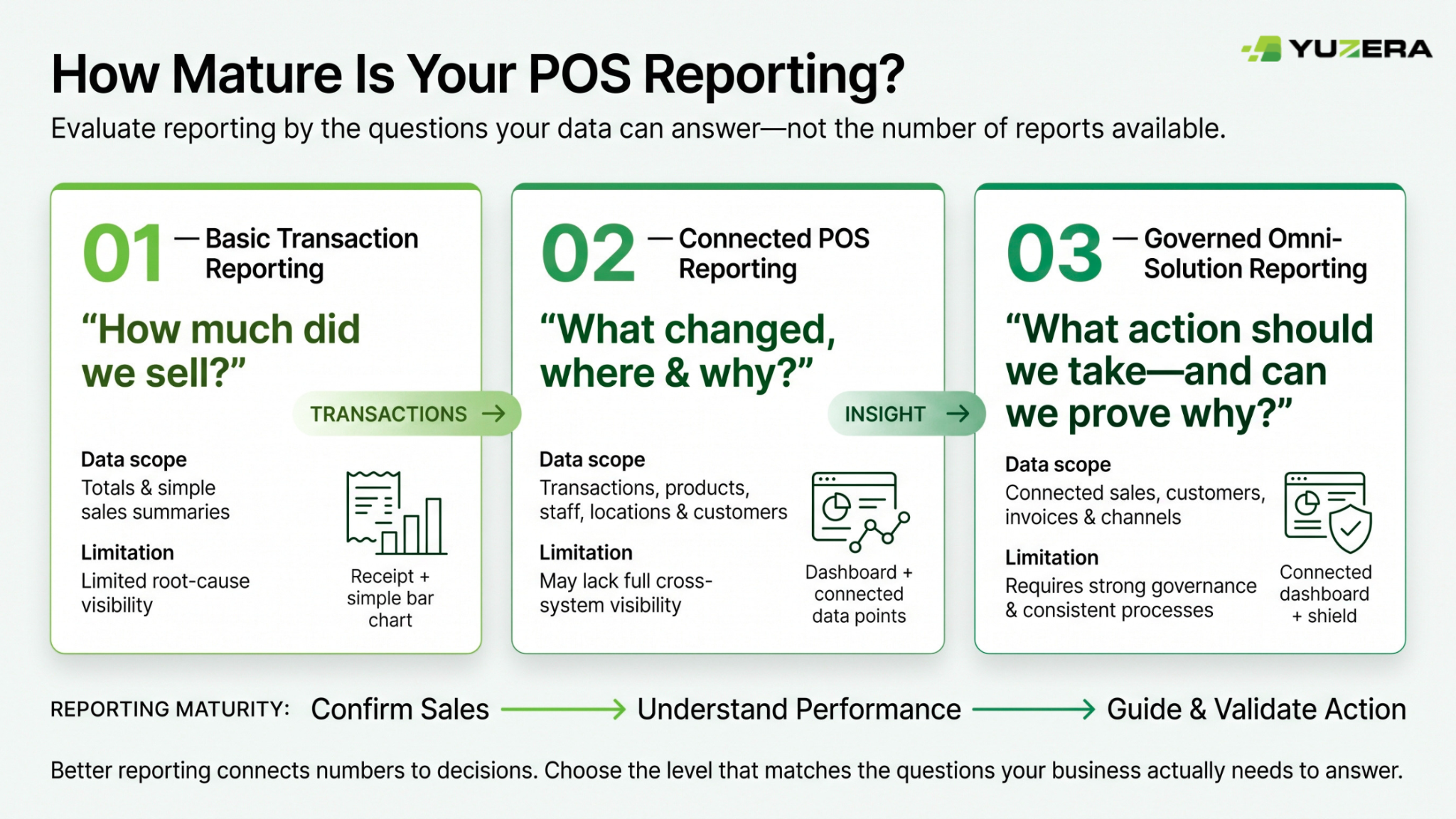
Merchants looking for a payment solution with detailed reporting should evaluate POS reporting maturity by what questions the system can answer, not by how many reports it ships with. A long report catalog means little if a manager cannot get from a headline number to the underlying transaction. The table below describes three broad operating approaches, arranged by how much of the business they connect.
Read this as an evaluation lens rather than a product taxonomy. Systems rarely fit cleanly in one column, and no single approach works for every merchant. A single-location specialty retailer with predictable traffic may be well served by connected reporting and have no immediate need for governed cross-channel workflows. A multi-location operator running face-to-face and e-commerce with invoiced B2B sales alongside retail almost certainly does.
The right question is which column matches the decisions you are actually trying to make, and what it would cost in discipline, not just in software, to move up a column. Each level carries a real limitation, which is why the final row states it explicitly.
| Dimension | Basic transaction reporting | Connected POS reporting | Governed omni-solution reporting |
|---|---|---|---|
| Primary purpose | Confirm that sales occurred | Understand sales and operational patterns | Coordinate sales, customers, invoicing, security, and cross-channel operations |
| Data scope | Totals and simple summaries | Transaction, product, staff, location, and customer fields where applicable | Connected transaction, customer, invoice, operational, access, and channel data |
| Time horizon | End-of-day or periodic review | Intraday and daily operational review | Real-time exception monitoring plus historical trend analysis |
| Customer view | Little or no customer context | Customer profiles and purchase history where consent permits | Consent-aware customer records, segmentation, lifecycle insight, controlled access |
| Invoice relationship | Invoice records may exist separately | Invoices may connect to sales records | Invoice, customer, transaction, adjustment, and retention workflows designed to be traceable |
| Security and governance | General user access | Basic permissions and report access | Role-based access, documented governance, auditability, privacy controls, incident procedures |
| Best question answered | How much did we sell? | What changed, where, and why? | What action should we take, and can we prove the underlying record? |
| Limit to state clearly | May not reveal root causes | May not provide full cross-system visibility | Requires disciplined definitions, implementation, access governance, and review routines |
A 12-step checklist for getting more from POS reporting, analytics, and invoicing
-
Set the business decisions first. Define which specific decisions the POS environment should improve before touching a configuration screen: product assortment, staffing levels, location operations, customer follow-up, invoice follow-up, exception review, or cross-channel visibility. Every report should trace back to one of them.
-
Inventory every source of transaction activity. Document face-to-face checkout, mobile selling, invoicing, e-commerce, order-ahead, returns, credits, and manually entered transactions. Any source you miss becomes a permanent gap in the reporting, and gaps discovered at year-end are expensive to close retroactively.
-
Create a shared data dictionary. Define sale, completed transaction, refund, void, credit, invoice, customer, repeat customer, discount, location, daypart, and channel in writing. Confirm that operations, finance, and leadership interpret each term the same way. Most reporting disputes are definition disputes in disguise.
-
Choose a limited set of executive KPIs. Start with gross sales, transaction count, average transaction value, refund and void count and rate, payment-method mix, top categories, sales by location, invoice status, and customer opt-in count. Resist adding more until these are trusted and reviewed consistently for at least a full quarter.
-
Add operational drill-downs. Configure reporting so a manager can move from an overall number into location, channel, item, category, date, time, transaction, invoice, or user detail without leaving the interface or requesting an export. Drill-down depth is the single best predictor of whether managers actually use a dashboard.
-
Build an exception-reporting routine. Identify the patterns that require human review: unusually high refunds, voids, discounts, overrides, invoice changes, atypical transaction volume, or unexpected payment-method shifts. Set thresholds deliberately, then review them quarterly against how many alerts led to action.
-
Connect invoices to the underlying commercial record. Where your workflow supports it, make invoice number, customer information, sold items or services, taxes, credits, and payment status traceable back to the related transaction. This is what makes an integrated invoicing feature worth more than a standalone invoicing tool at audit time.
-
Design customer data around stated purposes. Decide why each customer field is collected before you collect it. Capture only what that purpose requires, and never treat marketing consent as a condition of basic service. Fields collected just in case become retention obligations you did not plan for.
-
Make consent operational. Give staff a clear workflow for collecting, viewing, updating, and honoring customer consent preferences, including a visible path to withdraw consent where applicable. Consent that lives only in a policy document, not on the customer profile, is not operationally usable.
-
Assign access by role. Separate clerk, manager, finance, administrator, and privacy responsibilities with distinct permission sets. Apply need-to-know access to customer data, reports, invoices, and administrative settings, and review the permission matrix whenever someone changes roles or leaves the business.
-
Document retention, security, and incident procedures. Set retention periods for customer data and business records, preserve what tax and audit obligations require, and document your security logging practices, breach response steps, and escalation responsibilities. Document these before you need them, not during an incident.
-
Run a recurring management review. Review real-time exceptions as they surface, daily operations daily, weekly trends weekly, and strategic reporting monthly or quarterly. Update dashboard definitions and alert thresholds whenever the business model, channels, locations, or product mix changes materially.
FAQ
Q1) What should merchants look for in a POS analytics dashboard?
Look for whether the dashboard supports drill-down from a summary figure into transaction-level detail, and whether it covers both face-to-face and e-commerce activity in one view. Given that U.S. e-commerce represented 16.4% of total retail sales in 2025, according to the U.S. Census Bureau, a dashboard that reports only one channel reports on a partial business. Also check that payment-method mix, refund and void rates, and location comparisons are available without a custom export request.
Q2) Why does real-time payment reporting matter if sales are already reviewed daily?
Real-time reporting matters when the response window is shorter than a day. A void spike on one register, a mid-shift transaction drop at a location, or a sudden payment-method shift are all situations where same-hour visibility enables a phone call and next-day visibility does not. Payments Canada describes real-time risk monitoring as continuously analyzing transactions using current and historical data. Daily review remains essential for close-out and accountability, but it cannot catch what has already finished happening.
Q3) What separates detailed payment reporting from basic sales totals?
Detailed payment reporting provides transaction-level records with enough context to identify the underlying source document, not just period summaries. The IRS states that machine-readable records must include sufficient transaction-level detail to identify underlying source documents and provide audit trails between records, books, and returns. Practically, that means a reported figure can be traced to a specific sale, terminal, timestamp, user, and payment method, and that detail survives the required retention period.
Q4) How should customer management payments features handle consent and privacy?
Consent status should be visible and editable on the customer profile itself, with a documented withdrawal path. The Office of the Privacy Commissioner of Canada states that knowledge and consent are required to collect, use, or disclose personal information. That consent for secondary purposes like marketing should not be a condition of supplying a product or service. Customer data should also have a documented retention schedule, since PIPEDA requires information to be kept only as long as necessary for the identified purpose.
Q5) What are the advantages of built-in invoicing over a standalone tool?
This native functionality keeps the invoice attached to the transaction that produced it, which preserves the audit trail across the full retention period. The Canada Revenue Agency generally requires sales and purchase invoices to be kept for six years from the end of the year they relate to. Revenu Québec also requires the purchaser’s name, payment terms, and a description of the property or service on invoices totaling $500 or more. Generating invoices inside the POS makes those fields a configuration decision rather than a manual habit.
The POS should be built for the owner, not only the clerk.
The most useful POS environment serves two people at once. The person at the counter needs speed, reliability, and a workflow that does not ask them to think. The person running the business needs to know what happened, why it changed, and whether the underlying record will hold up. Those are not competing requirements, but they do require deliberate design on both sides.
Everything covered here comes back to one idea: the data already exists. Twenty-two and a half billion Canadian retail payment transactions in 2024 generated an enormous behavioral record. What separates merchants who benefit from it is whether the reporting layer turns that record into a question someone can answer today, backed by a trail they can prove tomorrow.
Yuzera is a forward-looking, tech-forward resource for merchants navigating this shift, backed by Digitech’s track record in payment technology. Yuzera’s omni-solutions approach brings POS software and hardware, payment orchestration, and value-added services together so that a POS analytics dashboard, real-time payment reporting, detailed payment reporting, customer management payments, and built-in invoicing work as one connected system rather than separate tools bolted together.
Works Cited
- Canada Revenue Agency. “GST/HST Records You Need to Keep.”
- Deloitte. “Brand Loyalty Program Consumer Behavior.”
- Internal Revenue Service. “Automated Records.”
- Office of the Privacy Commissioner of Canada. “2024-25 Annual Report to Parliament.”
- Office of the Privacy Commissioner of Canada. “PIPEDA Findings #2022-005.”
- Office of the Privacy Commissioner of Canada. “PIPEDA Self-Assessment Tool.”
- Office of the Privacy Commissioner of Canada. “Principle 1 – Accountability.”
- Payments Canada. “Canada Reaches $12.2 Trillion in Payment Transactions in 2024.”
- Payments Canada. “Canada’s Future Is Real-Time.”
- Payments Canada. “Canadian Payment Data 2024.”
- Payments Canada. “Payment Fraud in Canada: Key Insights and the Path to Safer Payments.”
- PCI Security Standards Council. “Just Published: PCI DSS v4.0.1.”
- PCI Security Standards Council. “PCI DSS.”
- Revenu Québec. “Facturation obligatoire.”
- Revenu Québec. “Preparing Invoices.”
- Statistics Canada. “Analysis on Artificial Intelligence Use by Businesses.”
- Statistics Canada. “Canadian Survey on Business Conditions, Third Quarter 2024.”
- Statistics Canada. “Retail E-Commerce Sales, Monthly Table 20-10-0056-03.”
- Statistics Canada. “Retail Trade, December 2025.” The Daily.
- U.S. Census Bureau. “Quarterly Retail E-Commerce Sales, 4th Quarter 2025.”