Connecting Your Payment Gateway to the Platforms You Already Use
A WooCommerce payment gateway is a payment integration that connects a WooCommerce store’s checkout to a payment provider so authorizations, captures, refunds, and order-status updates flow correctly between the storefront and the provider. That definition sounds simple. In practice, the word “compatible” hides a lot of engineering.
Merchants replatform for good reasons: catalog growth, headless front ends, new markets, better content tooling, tighter POS alignment. What surprises most teams is how much of the payments layer gets dragged into the project. A gateway that worked fine for four years on a classic checkout can vanish from a block-based checkout. A provider that is fully supported on one platform may need approval before it can even be installed on another. Without a reliable digital products payment gateway, a store can start releasing files before payment is confirmed because one order-status setting was never mapped.
This guide breaks down what gateway compatibility requires across WooCommerce, Shopify, BigCommerce, and other CMS platforms, how a digital products payment gateway operates differently than one for physical goods, and how to switch platforms without breaking checkout continuity.
TL;DR
- WooCommerce documents four gateway patterns: form-based redirects, iframe experiences, direct on-page methods, and offline methods. Each pattern carries a different security burden, so “compatible” is never one uniform technical condition.
- Cart and Checkout blocks became the default for WooCommerce stores started after WooCommerce 8.3 in November 2023, and a legacy-compatible gateway can still fail to appear in that block-based checkout entirely.
- A Shopify payment gateway requires extensions to be from approved Payments Partners, guaranteeing at least 99.95% availability in any measurement period, and demanding idempotency, retries, mutual TLS, and compliance webhooks.
- A BigCommerce payment gateway handles Payment Access Tokens that expire after one hour, the Payments API is limited to 50 payment requests per four seconds, and headless storefronts require custom payment-provider integration for certain functionality.
- PCI DSS v4.x Requirements 6.4.3 and 11.6.1 focus on authorizing payment-page scripts, verifying integrity, keeping a justified script inventory, and monitoring pages and HTTP headers for unauthorized change.
Why should switching commerce platforms not automatically mean switching gateway technology?
Switching commerce platforms should not force a payments rebuild, because the gateway relationship, the transaction lifecycle logic, and the fraud controls tuned over years are separable from the storefront rendering layer. The storefront changes. Money movement, the reconciliation model, and the order-state contract do not have to.
That said, separation holds only if the gateway integration was designed as an integration, not a button. The platform decides what an integration can look like. WooCommerce lets developers extend a base payment-gateway class and register the result as an available gateway through a plugin, documented in the Payment gateway API. Shopify runs a controlled Payments Platform where only approved Payments Partners can build payment extensions, as described in the payment extensions guide. BigCommerce routes payment requests through the store’s connected gateways for orders created via the Checkout API or the Orders API, as described in the Payments API overview. Three platforms, three completely different governance models for the same conceptual task.
So the honest answer to “can a merchant keep their gateway” is: it depends on native connector availability, platform approval rules, checkout architecture, and whether a custom integration is feasible for the team involved. No provider can promise native connectivity everywhere, and any provider claiming otherwise is glossing over the extension model that actually governs the platform.
Merchants can control the evaluation discipline. Before the replatform scope is locked, inventory every payments dependency the business has accumulated: express checkout buttons, saved payment instruments, authorization-then-capture workflows for backordered goods, refund tooling used by the support team, subscription or membership renewals, POS-to-online order visibility, and every downstream system that reads order status.
Each of those is a compatibility requirement, not a nice-to-have. Teams that treat replatforming as a front-end project discover the payment dependencies during user acceptance testing, which is the most expensive possible moment. Teams that treat it as an orchestration project map those dependencies first and choose a platform path that preserves them.
What should “payment gateway compatibility” include beyond a checkout button?
Payment gateway compatibility means the integration supports the full transaction lifecycle on that platform, not just rendering a payment option at checkout. A working button proves one thing: the storefront can display a method. It proves nothing about refunds, voids, delayed captures, webhook handling, or fulfillment triggers.
The typical Shopify payment gateway model makes the fuller definition explicit. According to the payment extensions guide, its extensions support transaction actions including charge, refund, authorization, capture, and void. That list is a useful compatibility rubric for any platform. If a support team can take a payment but cannot issue a partial refund from the admin, the integration is incomplete. If finance can capture but cannot void an unshipped authorization, the integration is incomplete.
Add the state machine to that rubric. WooCommerce explains that “Processing” generally means payment has been received and inventory has been reduced, while “On hold” may occur when payment confirmation is delayed or when authorization and capture are separated, per its order statuses guide. Those definitions matter because downstream automation reads them. Warehouse pick lists, accounting exports, email flows, loyalty accrual, and digital-file release all key off order status. A gateway that reports payment slightly differently than the previous one will silently change behavior across all those systems.
Then add resilience. Shopify documents that payment apps finalize payment sessions by resolving or rejecting them through GraphQL, and once the resolve or reject mutation is called, the payment state is final and cannot be changed, per the payment flow guide. That kind of finality is a design constraint. It means we must handle duplicate or out-of-order events before the terminal call, not after.
A practical compatibility definition therefore covers seven things: checkout rendering under the platform’s current framework, secure payment-data flow, the order-status contract, authorization and capture logic, refunds and voids, webhook or callback handling, and forward compatibility with platform and API updates. Anything less is a demo, not an integration.
What are the three integration models, and how do they change responsibilities?
There are three practical integration models for CMS payment integration: hosted or redirect payment pages, embedded forms and iframes, and direct payment fields collected on the merchant’s own checkout. WooCommerce categorizes gateways into four basic types along these lines, adding offline methods, in its Payment gateway API documentation. The model chosen sets the security posture more than any other single decision.
WooCommerce is direct about the tradeoff: form-based and iframe-based gateways post data offsite and therefore create fewer security issues for the merchant to consider, while direct gateways that collect payment fields on the merchant checkout require server security controls and may require a level of PCI compliance. That is the whole tradeoff in one sentence. Control costs responsibility.
The compliance boundary is not as clean as many teams assume, though. PCI SSC states that for e-commerce merchants using a third-party embedded payment page or form, including an iframe, SAQ A eligibility includes confirming that the merchant’s site is not susceptible to script attacks that could affect the merchant’s e-commerce system, per its script eligibility FAQ.
Embedding a provider’s form does not transfer the security of the hosting page. The same FAQ notes that this particular criterion does not apply to merchants who redirect customers to a third-party payment page or fully outsource payment functions through a payment link. However, eligibility still depends on the complete merchant environment and the applicable validation requirements.
In practice, that creates three distinct engineering focuses. Hosted redirect flows demand rigorous return handling, status synchronization, and callback verification, because the authoritative event arrives asynchronously rather than from the browser. Embedded flows demand script inventory, integrity controls, tamper detection, and checkout-framework compatibility testing. Direct field collection demands all of the above plus server hardening, strict API discipline, retries, and idempotency.
Merchants should choose the model that matches organizational maturity, not the one that photographs best in a design review. Full checkout control is genuinely valuable for high-volume merchants with dedicated security engineering. For most teams, an embedded or hosted model with excellent status synchronization delivers better outcomes than a direct integration nobody has time to maintain.
WooCommerce: why does Checkout Block compatibility deserve its own audit?
A WooCommerce payment gateway that works perfectly in the classic checkout can be absent from the block-based checkout, because block support is a separate integration requirement. This is the single most common surprise in WooCommerce payment gateway migrations right now, and it deserves a dedicated line item in any replatform or upgrade plan.
WooCommerce’s developer documentation states that a custom payment method for the newer Checkout block requires payment-method integration work in addition to the traditional Payment Gateway API implementation, per its payment method integration guide. The work spans both sides of the stack: payment methods are registered client-side through the blocks registry, while the server-side integration uses a class extending WooCommerce’s AbstractPaymentMethodType. WooCommerce explicitly notes this is separate from the Payment Gateway API needed for payment execution: two distinct implementations, one gateway.
The urgency comes from defaults. WooCommerce says Cart and Checkout blocks became the default experience for stores started after the release of WooCommerce 8.3 in November 2023, according to its cart checkout customization documentation. Newer stores use blocks unless someone chose otherwise, and the same documentation warns that if active payment gateways are incompatible with the Checkout block, customers may see no payment methods at all. WooCommerce provides a one-click option to revert to classic checkout when incompatible extensions are active, which is a useful safety valve and a strong argument for rollback planning.
Display logic is conditional in a way worth testing directly. The Checkout block shows payment methods only when they are both available in the store and compatible with the block, per the gateway’s configuration and the Checkout block guide. Express payment methods are a further, separate condition: WooCommerce describes them as one-button payment experiences and says the Express Checkout block appears only when an active gateway supports express checkout.
So the audit is concrete. Load a real block-based checkout on staging. Confirm each intended method renders. Confirm express buttons render where expected. Then run a transaction through to completion and verify the resulting order status. Merchants comparing WooCommerce payment gateway options should run this exact test rather than trusting a compatibility badge.
Shopify: why do payments-extension approval and operational requirements matter?
Shopify governs payment gateway approval and operational requirements, not the merchant, because payment extensions live inside a controlled Payments Platform with approval, distribution, and reliability requirements attached. Understanding those rules before choosing a Shopify payment gateway saves a great deal of rework.
Access starts with eligibility. Shopify states that only approved Payments Partners can build payment extensions on its Payments Platform, and its payments approval guide notes that the payments platform is invitation-only. At the same time, Shopify continues building out the Payments Apps API. Organizations can apply to be considered, but applying does not guarantee acceptance. That constraint alone answers many “bring your own gateway” questions.
Distribution works differently too. Shopify’s payment extension requirements state that payment extensions are not visible or installable in the Shopify App Store. Merchants reach them through a direct installation link, or through Shopify’s available payment-gateway list once the extension qualifies. Qualification for that public list has hard thresholds: use by at least 50 Shopify stores and more than US$1 million in processed volume, per Shopify’s merchant onboarding guide.
Activation is a sequence, not a settings screen. Shopify documents a flow in which the merchant installs the payment app, configures it, the app marks itself ready through Shopify’s API, Shopify enables activation, and the merchant then activates it in Shopify admin. Each step is a place a go-live can stall if timelines assume a same-day switch.
The operational bar is equally explicit, whether you are launching a payment gateway for Shopify Canada or entering a global market. Shopify requires payments extensions to be operational and available 24 hours a day, 7 days a week, at least 99.95% of the time in any measurement period, with a response to outages or issues within two hours. It also requires idempotency, retry behavior for network errors, mutual TLS for relevant Shopify-to-app requests, supported API versioning rather than unstable production versions, and compliance webhooks. Read those as a specification for what a serious gateway integration looks like anywhere, not only on Shopify. Merchants evaluating a Shopify payment gateway should ask providers to speak to each requirement directly.
BigCommerce: what do connected gateways, headless checkout, and API limits require?
A BigCommerce payment gateway operates through the store’s connected gateways, with the Payments API enabling payments for orders created through either the Checkout API or the Orders API, per the Payments API overview. This BigCommerce payment gateway architecture is API-forward, which is a strength for custom builds and a source of specific constraints worth designing around.
Start with the request pattern. BigCommerce documents a two-step sequence: create a Payment Access Token, then submit the payment request. The token expires after one hour. Any queued, retried, or batch-oriented payment process needs to account for that window rather than assuming a long-lived credential. Throughput is also bounded, with a documented Payments API rate limit of 50 payment requests per four seconds. For flash sales, marketplace syncs, or bulk order creation, that limit belongs in the load model.
Support is not binary at the gateway level. BigCommerce publishes a compatible-gateway table distinguishing whether a gateway supports stored payment instruments, raw card data, or both. A gateway on a supported list doesn’t guarantee it covers every checkout or stored-card use case a merchant has in mind, so verify it against the instruments actually in use.
Authentication carries a specific constraint. BigCommerce says 3-D Secure requires shopper interaction, and a card requiring 3-D Secure must first be saved during a shopper-initiated transaction before it can be charged as a stored payment instrument through the server-to-server Payments API. Attempting to charge an unsaved card requiring 3-D Secure will be unsuccessful. Whether setting up a BigCommerce payment gateway in Canada specifically supports or configuring a global rollout, any recurring, invoice, or back-office charging design must deliberately plan the initial shopper-present step.
Headless deserves its own scoping line: BigCommerce states that headless storefronts require a custom integration with the payment provider for certain functionality. Merchants moving to a decoupled front end should not assume the connected-gateway configuration carries over untouched.
Two more items keep operations clean. The payment methods reference says the V3 Payment Methods API is current and should be used for new integrations, with V2 deprecated and retained only for unmigrated integrations. The Transactions API guide notes that external payment records support only subsequent capture or void actions when the provider is already enabled and configured with the same channel and currency. Merchants comparing a BigCommerce payment gateway setup against other options should confirm channel and currency alignment early.
What does Adobe Commerce reveal about extensible CMS payment integration on other platforms?
Adobe Commerce shows what enterprise-grade CMS payment integration looks like when the platform exposes a full gateway framework rather than a connector slot. In its payments integrations guide, Adobe describes its payment-provider gateway as a mechanism for integrating stores with payment service providers and creating and handling transactions based on order details. That framing is deliberate: the gateway handles transactions, not just form submission.
The component model is where the lesson lands. Adobe documents payment-gateway components including gateway commands, command pools, request builders, gateway clients, and response validators, per its gateway structure guide. Read that list as a checklist of concerns any serious integration must address on any platform. Commands express the operations supported. Request builders shape the payload. Clients handle transport. Response validators decide whether the platform should trust what came back. When a merchant asks what a payment processor for CMS websites should provide, this decomposition is a better answer than a feature grid, because it exposes where failures actually occur: malformed requests, unvalidated responses, and missing operations.
Adobe also gives an architectural instruction worth generalizing. Its payment module configuration guide advises developers not to edit default code for compatibility, upgradeability, and maintenance reasons, and to add custom payment integrations in separate modules. Every merchant who has inherited a payments customization welded into core files understands why. Isolated modules survive platform upgrades. Patched core files do not, and the bill arrives during a security release when the upgrade cannot wait.
Saved payment methods are an explicit extension of the same framework, not an afterthought. Adobe’s payment-integrations guide covers adding a custom payment method and adding vault payments for a custom payment method. Tokenized reuse changes data-handling posture, customer-service workflows, and authentication requirements, so it should be scoped as its own workstream.
The broader takeaway for merchants evaluating any CMS payment integration: enterprise compatibility usually requires more than installing a connector. Budget for framework-level work, keep it modular, and validate responses rather than assuming success.
Physical goods versus digital products: why does payment-confirmation timing matter so much?
Payment-confirmation timing matters most for digital products because the fulfillment event is instantaneous and irreversible. Ship a physical item too early, and it can often be intercepted. Release a download too early, and the asset is gone. Evaluate any digital products payment gateway decision against the release rule, not just the checkout experience.
WooCommerce makes the mechanics visible. Its virtual downloadable products guide explains that marking a product as virtual removes shipping-related fields and prevents the shipping calculator from triggering. At the same time, a downloadable product that isn’t also marked virtual can still include shipping information and shipping calculations. That distinction lets mixed physical-and-digital orders behave sensibly. The same documentation notes that paid orders containing only products marked both virtual and downloadable automatically skip Processing and move to Completed, and that this auto-completion workflow depends on the payment method correctly identifying the order as paid. Read that clause carefully. The gateway’s payment signal triggers automatic fulfillment.
Release timing is configurable. WooCommerce can grant download access after payment when an order is in Processing status rather than waiting for Completed, per its downloadable products guide. If that setting is not enabled, customers receive access when the order reaches Completed. Choose deliberately, then test both the happy path and the delayed-confirmation path, because a hosted redirect can return a customer to the site before the authoritative payment notification arrives.
When evaluating a payment gateway for digital products in Canada or globally, remember that the delivery method is a security control, not a performance setting. WooCommerce describes Force Downloads and X-Accel-Redirect/X-Sendfile as methods that protect files from outside access, while Redirect Only exposes a download URL and does not protect files from outside access, per its product settings guide.
As any robust digital products payment gateway should accommodate, Shopify handles mixed orders with separate fulfillment tracks. Its digital products guide explains that the Digital Products app can deliver a file or access link after purchase. For an item with both physical and digital components, automatic fulfillment can send and mark the digital asset as fulfilled. In contrast, the physical component follows the merchant’s separate physical-fulfillment settings. Shopify also warns that editing or deleting a digital file breaks the download link for customers who already purchased it, which makes asset versioning an operational policy question.
How should order status, authorization, capture, refunds, and reconciliation be handled?
Handle order status by writing an explicit order-state contract before building the integration: define exactly which gateway event moves an order from unpaid or pending into authorized, captured, paid, processing, completed, failed, canceled, or refunded. Without that contract, each platform’s defaults quietly become the business rules.
The stakes are clearest in WooCommerce’s definitions. “Processing” generally means payment has been received and inventory has been reduced, while “On hold” may occur when payment confirmation is delayed or when authorization and capture are separated, per the order statuses guide. If a new gateway leaves orders On hold pending an asynchronous confirmation that a previous gateway delivered synchronously, inventory behavior, customer emails, and warehouse queues all shift on day one.
Post-purchase operations belong in the same contract. Shopify’s extension model supports charge, refund, authorization, capture, and void as distinct transaction actions, per the payment extensions guide. Map each action to a real internal workflow: who performs it, from which interface, and what the resulting order state should be. Partial refunds and partial captures deserve particular attention, since they are often where a technically successful integration fails an operations team.
Reconciliation adds a platform-configuration dimension. BigCommerce’s Transactions API guide notes that its Transactions API can create records for payments completed externally. Still, the provider must already be enabled and configured in BigCommerce with the same channel and currency for BigCommerce to perform subsequent capture or void actions. Multi-channel merchants recording marketplace, POS-adjacent, or invoiced payments in the platform need that alignment set up before volume arrives, not after finance flags a mismatch.
Finality changes the design as well. Because Shopify payment states become immutable once the app resolves or rejects a payment session through GraphQL, per the payment flow guide, reconciliation logic must reason about terminal states rather than expecting to correct them later.
The deliverable is a single documented table that engineering, finance, support, and fulfillment teams all agree on: gateway event, platform status, downstream system effect, and owner. Build it once, test every row, and the replatform stops being a guessing exercise.
How can checkout pages, callbacks, and customer accounts be protected from fraud?
Protect checkout by treating three surfaces as separate problems: the payment page in the browser, the callback channel between gateway and platform, and the customer account itself. Each has distinct controls and distinct failure modes.
Payment-page security now has explicit standards attention. PCI SSC explains that PCI DSS v4.x Requirements 6.4.3 and 11.6.1 focus on authorizing payment-page scripts, checking their integrity, maintaining a justified script inventory, and monitoring payment pages and relevant HTTP headers for unauthorized changes, per its e-skimming guidance update. On a CMS-driven store, scripts accumulate: analytics, chat, personalization, A/B testing, tag managers. Each is a candidate for the inventory, and each needs a documented justification for being on a payment page.
Embedding a provider’s form does not remove this work. PCI SSC’s script eligibility FAQ states that SAQ A eligibility for merchants using a third-party embedded payment page or form, including an iframe, includes confirming the merchant’s site is not susceptible to script attacks that could affect the merchant’s e-commerce system. PCI SSC also says merchants should consult the entity that accepts their compliance validation, so treat scope questions as a conversation with that compliance-accepting entity, security team, and legal counsel rather than something settled by a vendor datasheet.
The callback channel is where integration bugs turn into financial and fulfillment errors. OWASP’s gateway integration cheat sheet recommends validating the authenticity of third-party gateway callbacks, such as through HMAC signatures or secret tokens, and implementing idempotency so an order is handled only once even if a callback arrives multiple times. Duplicate delivery is normal behavior for reliable webhook systems, not an edge case. Design for it. A repeated callback must never create a second fulfillment, a second download grant, or a second status transition.
Account-level fraud is the third surface. NIST’s e-commerce MFA guide describes stronger authentication approaches that can reduce risk from account takeover and fraudulent card-not-present transactions, including triggering extra authentication when risk thresholds are exceeded. Risk-based step-up keeps friction proportional, which is the point: protect the accounts and transactions that warrant it without taxing everyone else.
How do WooCommerce, Shopify, and BigCommerce compare on gateway compatibility?
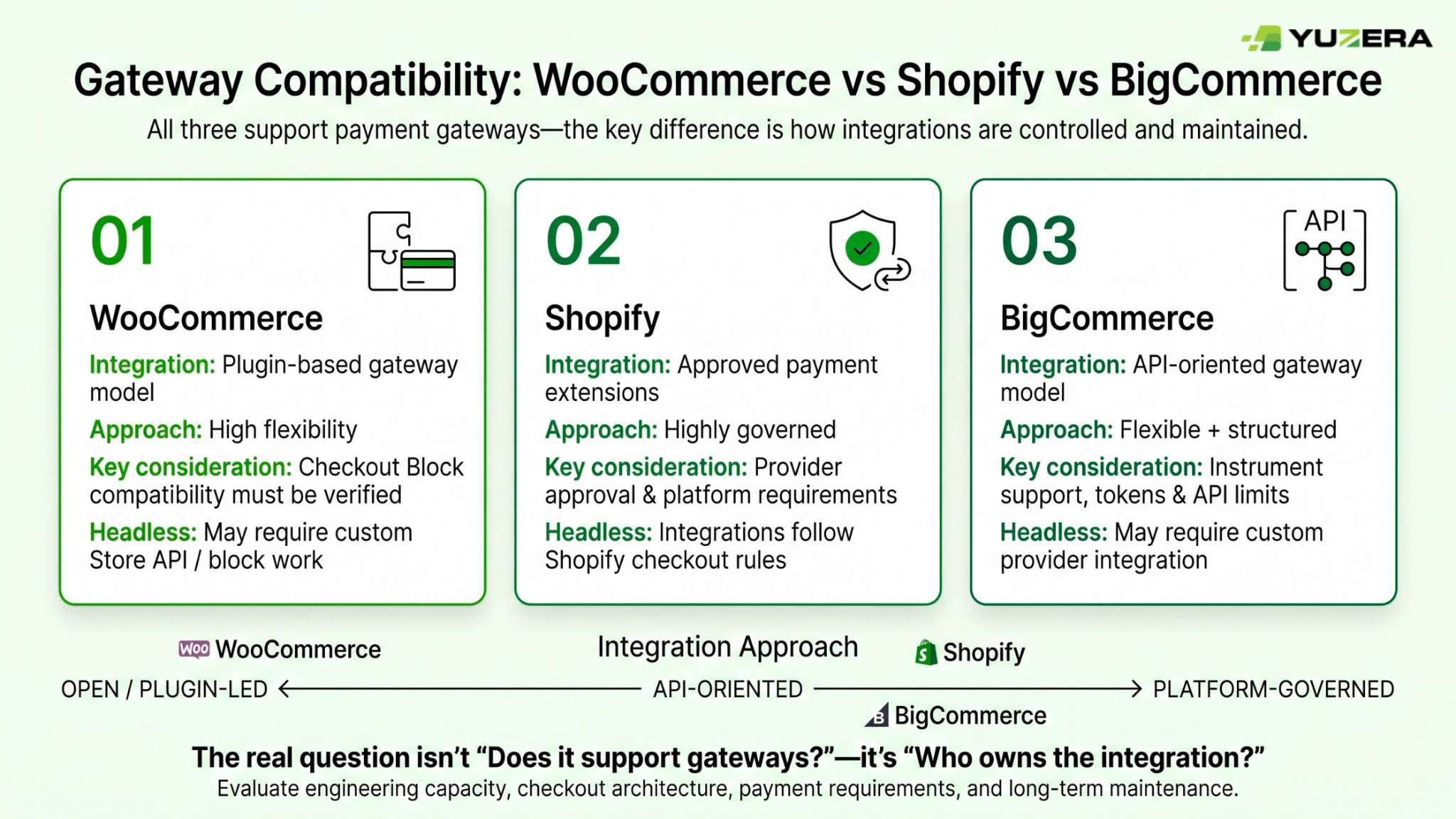
The three platforms differ less in whether they support gateways and more in who controls the integration and where the failure modes sit. WooCommerce gives merchants the most latitude and responsibility because its plugin-based extension model is open, but block-checkout compatibility is a separate build that must be verified independently. Shopify gives the most governance, with approval gates and explicit reliability obligations that filter which providers can participate at all. BigCommerce sits between the two, offering API-oriented flexibility alongside documented token lifetimes, rate limits, instrument-level support differences, and a stated need for custom provider integration in headless implementations.
Use the table below as an evaluation frame rather than a verdict. The right platform depends on engineering capacity, market and currency requirements, whether checkout is headless, and how tightly digital fulfillment is coupled to payment confirmation. Read across each row and ask what the organization can realistically own over the next three years, not just at launch.
| Dimension | WooCommerce | Shopify | BigCommerce |
|---|---|---|---|
| Primary integration model | Gateway plugins built on the Payment Gateway API; Block Checkout needs added client- and server-side work | Payment extensions inside a controlled Payments Platform, built only by approved Payments Partners | Payments API operating through connected gateways; headless may need custom provider integration |
| Current compatibility issue | A legacy-compatible gateway can still fail to display in the Checkout block | Extensions must clear requirements, review, and onboarding before merchant activation | Support can differ by instrument type, including raw card data versus stored instruments |
| Enterprise extensibility | High flexibility via plugins and custom extensions, with block compatibility to validate | Highly governed, restricted access, approval required | API-oriented, supports custom checkout and external apps with documented token flows |
| Reliability requirements | Gateway must update order payment status correctly for downstream automation | Idempotency, retries, mTLS, supported API versions, compliance webhooks, 99.95% availability | Access tokens expire in one hour; design for 50 requests per four seconds |
| Headless implications | Custom blocks and Store API work may be needed | Extensions integrate into Shopify checkout under platform rules | Custom payment-provider integration required for certain functionality |
| Digital-product link | Payment confirmation and order status govern download access | Digital assets can fulfill independently of the physical component | Verify order-state and fulfillment-event behavior for the chosen implementation |
A 14-step checklist for switching platforms without breaking checkout
-
Map the current commerce environment. Record the CMS or commerce platform, checkout type, gateway integration type, digital-product workflows, physical-fulfillment workflows, POS environment, and every connected business system that reads order or payment data.
-
Identify the checkout architecture in use. Determine whether the store runs a hosted redirect, embedded form, iframe, direct payment fields, classic checkout, block-based checkout, or a custom headless flow. WooCommerce’s four gateway patterns provide a workable classification model.
-
Confirm the gateway supports the platform’s current checkout framework. For WooCommerce, test Cart and Checkout Blocks directly rather than assuming a legacy plugin integration will render in the block-based checkout. Load staging, place a real test order, and confirm.
-
Check that the desired payment experience is genuinely supported. Verify required payment methods, express-checkout behavior, stored-payment-method support, authorization and capture behavior, refunds, voids, and any buyer-authentication flows required in target markets.
-
Validate platform eligibility and distribution requirements. For Shopify, establish whether the provider is an approved Payments Partner and whether the relevant payment extension is installable for the specific merchant configuration and markets before committing to timelines.
-
Validate markets, channels, currencies, and instruments. For BigCommerce, confirm the connected gateway supports the required instrument types and that external transactions will be configured with the matching channel and currency for later capture or void.
-
Document the order-state contract. Define exactly which gateway event changes an order to paid, authorized, captured, failed, canceled, refunded, processing, or completed. This matters most where physical fulfillment and digital access follow different timing rules.
-
Configure digital-product release rules before launch. Decide when files, links, vouchers, licenses, or memberships become available, and confirm release follows verified payment status rather than an unverified customer return from a hosted payment page.
-
Secure downloadable assets separately from payment acceptance. For WooCommerce downloads, choose a delivery method appropriate to file size and security needs, and avoid unprotected redirect delivery when protected file access is actually required.
-
Design callback handling for authenticity and duplicates. Verify signatures or secret tokens, log every event, apply idempotency keys or equivalent logic, and ensure a repeated callback cannot produce duplicate fulfillment or duplicate order updates.
-
Implement checkout-page security controls. Inventory the scripts running on payment pages with a justification for each, establish authorization and integrity controls, and monitor page content and relevant HTTP headers for unauthorized change.
-
Test the full transaction lifecycle in a non-production environment. Cover success, decline, abandonment, redirect return, timeout, delayed notification, duplicate webhook, refund, void, authorization-only, digital fulfillment, physical fulfillment, and support-team visibility.
-
Plan cutover with rollback capability. Keep the existing checkout and gateway path recoverable until the replacement passes functional, security, reconciliation, and fulfillment testing. WooCommerce’s revert-to-classic option shows why rollback planning earns its keep.
-
Operate the integration as a maintained product. Monitor API-version notices, plugin and gateway updates, platform changes, payment-method availability, checkout errors, callback failures, payment-page scripts, and order-status anomalies on a recurring schedule.
Where an omni-solutions technology partner fits
An omni-solutions technology partner helps when the payments layer must stay consistent across a storefront, a POS environment, and the back-office systems that read order data, because different teams usually manage those surfaces with different release cycles. Replatforming exposes every seam between them at once.
That is the work Yuzera is built around: proprietary POS software and hardware, payment orchestration, and value-added services delivered as one connected stack rather than a set of disconnected point tools. Whether integrating a WooCommerce payment gateway in Canada natively supports or a global checkout, the practical value during a platform change is continuity. The order-state contract, callback verification approach, digital-release rules, and reconciliation model can stay stable while the storefront layer moves. Yuzera is backed by parent company Digitech, a separate brand whose long track record in merchant technology informs how Yuzera builds its solutions.
For merchants running both face-to-face and e-commerce channels across Canada and the US, the hardest problems are rarely the payment form itself. They are the mismatches: a POS order that appears differently than an online order in the same reporting view, a refund issued in one system that never reflects in another, a digital entitlement granted on a status that means something slightly different than it used to. Orchestration makes those behaviors consistent, regardless of which front end originated the transaction.
None of that removes the platform-specific homework in this guide. Shopify’s approval model still applies. WooCommerce block compatibility still needs testing. BigCommerce token lifetimes and rate limits still shape the architecture. A good technology partner doesn’t pretend those constraints away; it plans around them, documents the decisions, and maintains the integration after go-live when real defects surface.
Merchants scoping a platform change who want an education-first conversation about checkout continuity, orchestration design, or POS and e-commerce alignment can start at the Yuzera homepage. Bringing a current order-state map often reveals more about integration risk than any feature comparison.
FAQ
Q1) What should be checked before choosing a WooCommerce payment gateway?
Confirm the gateway renders in whichever checkout framework the store actually uses, since a plugin built for the classic checkout may not appear in the block-based checkout at all. WooCommerce says Cart and Checkout blocks became the default for stores started after WooCommerce 8.3 in November 2023. Also verify express checkout support, refund and void handling from the admin, and that download permissions are released only on confirmed payment status.
Q2) Is a BigCommerce payment gateway affected by channel and currency settings?
Yes. BigCommerce requires a provider to be already enabled and configured with the same channel and currency before the platform can perform subsequent capture or void actions on externally recorded transactions. Confirm instrument requirements too, since BigCommerce distinguishes gateways that support stored payment instruments, raw card data, or both. For a headless storefront, plan for custom payment-provider integration for certain functionality.
Q3) How should a Shopify payment gateway be evaluated?
Start with eligibility, because Shopify allows only approved Payments Partners to build payment extensions, and its payments platform is invitation-only while the Payments Apps API is being built out. Confirm the extension is installable for the specific merchant configuration and markets involved, since payment extensions are not visible in the Shopify App Store. Then review the operational requirements: idempotency, retries, mutual TLS, supported API versions, compliance webhooks, and at least 99.95% availability.
Q4) What makes a good payment processor for CMS websites?
Look past the checkout form to the framework underneath. Adobe Commerce documents gateway commands, command pools, request builders, gateway clients, and response validators as distinct components, which is a useful rubric for judging any CMS payment integration. A strong integration validates responses rather than assuming success, verifies callbacks with HMAC signatures or secret tokens, applies idempotency, and lives in a separate module so platform upgrades stay safe.
Q5) What matters most for a digital products payment gateway?
Timing and asset protection. Digital release is instant and hard to reverse, so confirm download access based on verified payment status rather than a customer’s return from a hosted payment page. WooCommerce can grant access at Processing or wait for Completed, and paid virtual-downloadable-only orders skip Processing entirely when the payment method correctly reports the order as paid. Use protected file delivery instead of exposed redirect URLs.
Works Cited
- Adobe. “Payments Integrations.” Adobe Developer.
- Adobe. “Payment Gateway Structure.” Adobe Developer.
- Adobe. “Module Configuration.” Adobe Developer.
- BigCommerce. “Payments API Overview.” BigCommerce Developer Documentation.
- BigCommerce. “Payment Methods.” BigCommerce Developer Documentation.
- BigCommerce. “Transactions API.” BigCommerce Developer Documentation.
- National Institute of Standards and Technology. “Multifactor Authentication for E-Commerce, Volume B.” NCCoE.
- OWASP Foundation. “Third Party Payment Gateway Integration Cheat Sheet.” OWASP Cheat Sheet Series.
- PCI Security Standards Council. “FAQ 1588.” PCI Security Standards Council.
- PCI Security Standards Council. “New Information Supplement: Payment Page Security and Preventing E-Skimming.” PCI Perspectives.
- Shopify. “Payments Apps.”
- Shopify. “Payments Extension Review.”
- Shopify. “Onboard a Merchant to a Payments Extension.”
- Shopify. “Payments Extension Requirements.”
- Shopify. “Payment Processing.”
- Shopify. “Digital Downloads.” Shopify Help Center.
- WooCommerce. “Payment Gateway API.” WooCommerce Developer Documentation.
- WooCommerce. “Payment Method Integration.” WooCommerce Developer Documentation.
- WooCommerce. “Customizing Cart and Checkout.” WooCommerce Documentation.
- WooCommerce. “Checkout Block.” WooCommerce Documentation.
- WooCommerce. “Order Statuses.” WooCommerce Documentation.
- WooCommerce. “Virtual and Downloadable Products.” WooCommerce Documentation.
- WooCommerce. “Digital and Downloadable Product Handling.” WooCommerce Documentation.
- WooCommerce. “Products Settings.” WooCommerce Documentation.