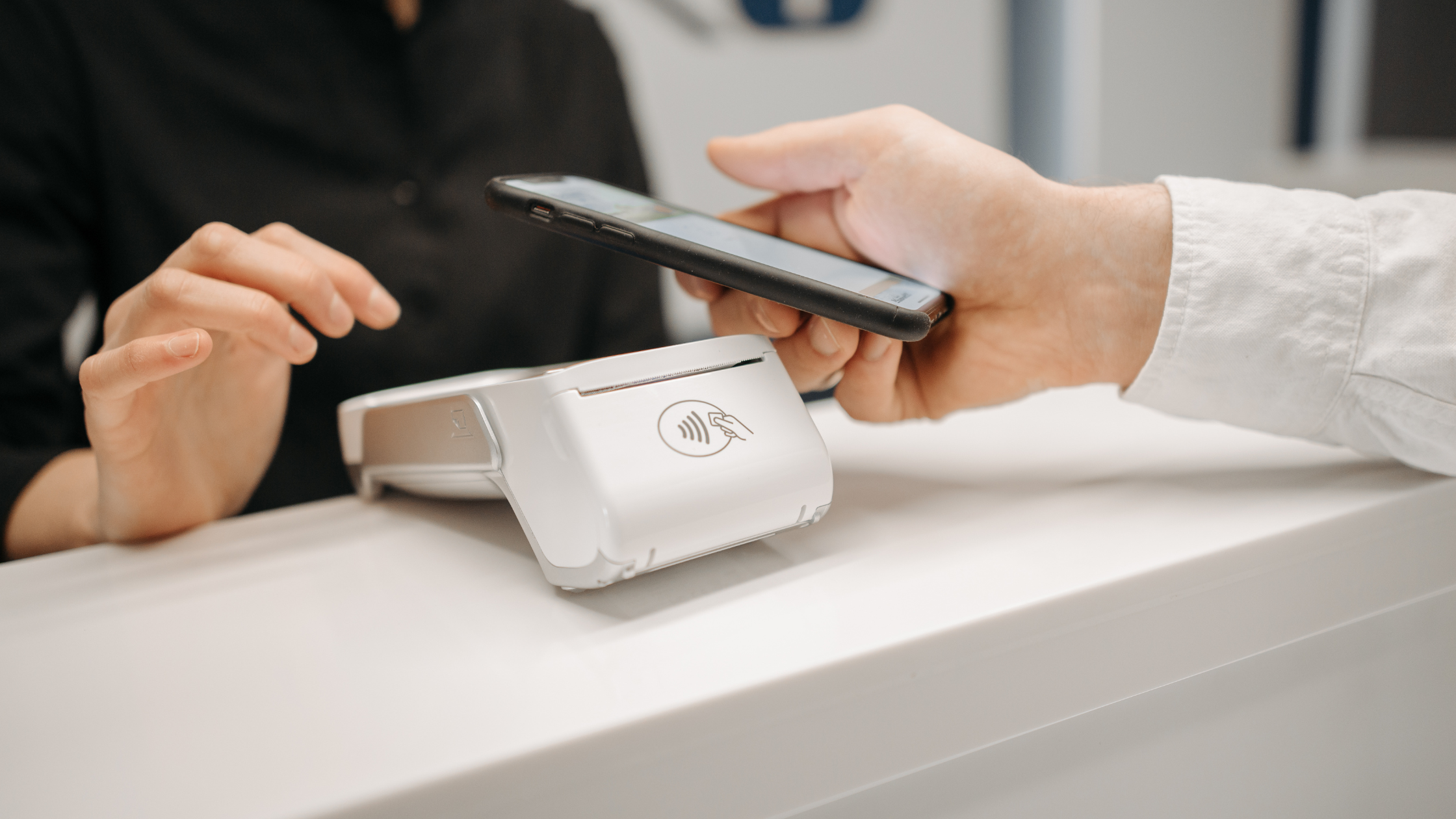
A branded payment gateway is a payment interface that carries your own name, colours, typography, and page logic through the moment a shopper enters card details, even when a specialized third party supplies part of that interface. The term matters because with white-label payments, the payment step is where a shopper decides whether the business they have been browsing is the same business now asking for a card number. “White-label” is not a standardized technical category; it is a commercial term, and whether you can change the logo, the domain, the field layout, the confirmation page, or the authentication screen depends entirely on the provider and the implementation. This guide sets out what each model genuinely allows, what it costs you in engineering and governance, and how to keep the experience consistent from storefront to confirmation.
TL;DR
- Baymard Institute reports a global average online cart abandonment rate of 70.19%, and 19% of 1,026 US adults surveyed in 2025 abandoned checkout because they did not trust the site with card data.
- In a benchmark of 344 leading US and EU e-commerce sites, 65% scored “mediocre” or worse on checkout UX, and only 2% were rated “good.”
- PCI DSS v4.0.1 Requirements 6.4.3, 11.6.1 and 12.3.1 became effective on March 31, 2025, putting script authorization and payment-page change detection on every e-commerce roadmap.
- WCAG 2.2 became a W3C Recommendation on October 5, 2023, adding nine success criteria, including Accessible Authentication (Minimum) at Level AA.
What is a branded payment gateway, and what can it actually control?
A branded payment gateway presents a third-party payment capability under your identity, so shoppers see your brand rather than an unfamiliar one at the point of card entry. What it controls depends on the implementation: some setups allow your logo, colours and domain on the payment page, while others allow only limited styling around provider-delivered fields.
Start with the technical object you are branding. The PCI Security Standards Council defines a payment page in its PCI payment page glossary as a web-based interface with form elements intended to capture account data or submit captured account data for authorization, and notes it may be a standalone page or a component inside an inline frame on another page. That distinction, standalone versus inline, is the hinge on which most branding questions turn.
The commercial case is straightforward. Baymard Institute’s payment form security research found that 19% of 1,026 US adult internet users surveyed in 2025 had abandoned a checkout in the prior three months because they did not trust the site with their credit-card information, and its qualitative work shows that visual cues and brand recognizability shape perceived security. A payment page that looks like someone else’s property invites exactly that hesitation.
What does a white label payment processor actually let you change?
Using white label payments lets you change the presentation layer around a payment capability, but not the ownership of the payment-capture elements themselves. In most hosted models, the provider still produces and delivers the fields that touch card data, while you control the surrounding page, the copy, the order summary, and the journey before and after.
The PCI Security Standards Council sets out the models clearly. In its direct post guidance, PCI SSC explains that with a redirect or iframe, the third-party provider produces the page accepting payment data, whereas in a direct-post model the merchant website produces some or all of the payment page and sends payment data from the browser to the third party. Those are different user-interface models and different engineering commitments.
The boundary inside an embedded form is strict. PCI SSC’s iframe SAQ eligibility FAQ states that “all web elements located within the same iframe as elements associated with payment card data are considered part of the payment page,” and that for SAQ A eligibility every element delivered to the consumer must originate only and directly from a compliant third-party service provider.
Script risk follows the same boundary. PCI SSC’s embedded script guidance notes that the script-attack criterion applies whenever a merchant page includes an embedded payment form, and that merchants can meet it either by protecting their own page from scripts targeting account data or by confirming with the provider that script-attack protections are built into the implementation.
So white label payments work well when your branding ambition lives in the container rather than the card fields. A tidy order summary, your typography on the page, your voice in the microcopy, and a familiar return path will carry most of the perceived continuity. Drifting payment-related elements outside the provider iframe changes the security and validation analysis, so treat the frame boundary as a design constraint, not a suggestion.
Choosing a custom branding checkout: hosted, embedded, or merchant-controlled?
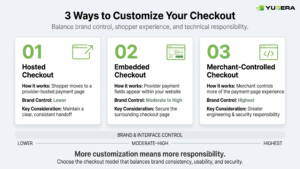
A custom branding checkout comes in three practical shapes: a hosted redirect page, an embedded provider form inside your checkout, and a merchant-controlled page built wholly or partly by your own site. Brand continuity rises across those three, and so does your engineering, security, and validation responsibility. Any custom branding checkout still has to answer the same practical question: how much of the page, versus how much of the card-entry mechanics, do you want to own?
The hosted payment page sends the shopper to a provider-delivered page. Continuity at the moment of card entry is lowest, but you can still signal the handoff clearly beforehand and return the shopper to a consistent confirmation journey. The embedded form keeps shoppers on your page and gives you the surrounding layout while the provider owns the fields. The merchant-controlled page gives the most say over layout and interaction design, and PCI SSC’s SAQ eligibility guidance notes that SAQ A-EP eligibility allows individual payment-page elements to originate from the merchant website or a compliant service provider, provided all other criteria are met.
None of the three is universally better. The real differentiator is usability, and most sites are leaving value on the table: Baymard’s checkout usability research found 65% of 344 benchmarked US and EU sites scored “mediocre” or worse, with the average large-scale site carrying 32 unique checkout improvements and a potential 35% conversion-rate increase from better checkout UX.
Finish the journey properly. Baymard’s order confirmation research finds confirmation pages are often treated as a dead end, when optional account creation, resources and surveys sit more naturally there than in the payment flow.
Keep the surrounding fields simple too. Baymard’s account creation research finds that 42% of sites ask shoppers to create an account before checkout begins, and recommends moving that invitation to the confirmation stage instead. Its checkout button research also found that 22% of sites use an “Apply” button on most fields, a pattern that can cause shoppers to lose entered data or see misleading errors; reserve explicit apply actions for promo codes and gift cards.
Is a hosted payment page the right fit for merchants in Canada?
A hosted payment page is a strong fit for Canadian merchants who want a standardzsed, provider-delivered payment experience with a clear separation between storefront and card entry. The governing standards are set internationally rather than nationally, so a merchant selling in Canada, the US, or both works to the same PCI DSS and WCAG expectations and should choose based on brand continuity needs and operational maturity.
Routing shoppers to this kind of page does not remove merchant-side responsibility. PCI SSC’s SAQ A scanning FAQ states that SAQ A merchants whose pages redirect customers to a third-party provider, or include an embedded iframe, still have responsibilities under SAQ A, including external vulnerability scanning. Treat the redirect as a narrowing of scope, never as an exit from it.
Timing matters too. PCI SSC’s SAQ merchant updates confirm that Requirements 6.4.3, 11.6.1 and 12.3.1 became effective on March 31, 2025. Its e-skimming security guidance frames those controls around authorising payment-page scripts, assuring their integrity, keeping an inventory with business justification, and monitoring pages and security-impacting HTTP headers for unauthorised change. A custom branding checkout is not automatically a safer one.
For merchants still assembling the storefront around the payment page, the starting point varies. Our e-commerce work supports merchants who bring an existing website, those who prefer a site-building route, and those who want Yuzera developers to build a full-service WordPress site, ensuring the custom branding checkout is designed alongside the brand rather than bolted on afterwards.
When is a payment solution for custom integrations worth it?
A custom payment integration is worth it when the business genuinely needs bespoke checkout behaviour, channel-specific experiences, or orchestration that a hosted configuration cannot express. Wanting a logo and brand colours is not sufficient justification, because an embedded provider form usually delivers enough visual continuity at a fraction of the governance load.
The case for a custom payment integration is operational. More control means owning secure frontend changes, script management, accessibility conformance, tested fallbacks, and the validation of your resulting responsibilities with your acquirer or qualified assessor. Baymard’s payment UX standards put the stakes plainly: “The payment step is the highest-anxiety moment in checkout.”
Three constraints shape every custom build. First, authentication is not fully yours. EMVCo’s 3DS experience guidelines describe an issuer that reviews the submitted data, decides the authentication type, performs it, then processes the transaction, and EMVCo states those UI/UX guidelines are not mandatory. Prepare shoppers with your own pre-authentication language instead of promising a fully branded challenge screen.
Second, accessibility. W3C’s accessible authentication guidance explains that properly marked-up fields let browsers and password managers identify and fill them, and that blocking autofill, copy, or paste fails the criterion unless an alternative exists. A custom UX layer must not defeat that.
Third, fallbacks. MDN classifies the payment request API as limited availability because it does not work across some widely used browsers, so keep a tested conventional form behind it.
FAQ
Q1) What does a branded payment gateway actually let us change?
A branded payment gateway is a payment interface that presents a third-party payment capability under the merchant’s own identity across the card-entry step. Depending on the implementation, that can include your logo, colours, typography, domain, and surrounding page layout. It does not necessarily extend to the payment-capture fields themselves, which are often delivered by the provider, or to issuer-controlled authentication screens.
Q2) How do white label payments work?
White label payments supply the payment capability while the merchant supplies the visible brand. Because “white-label” is a commercial rather than a technical category, no two offerings allow the same set of changes. PCI SSC’s iframe guidance makes the boundary concrete: every web element inside the same iframe as card-data elements counts as part of the payment page, which limits what you can place there.
Q3) Can we get a payment solution with custom branding without building our own checkout?
Yes. An embedded provider-delivered form inside your own checkout page gives strong visual continuity without the merchant producing the payment fields, and a hosted redirect can still be bracketed by your branded cart and confirmation pages. Baymard’s benchmark of 344 sites found only 2% achieved a “good” checkout UX rating, so usability work usually matters more than a custom build.
Q4) Is a hosted payment page in Canada an effective solution for local businesses?
Yes. This hosted payment page model suits merchants in Canada that want a standardized, provider-delivered card-entry experience, and the applicable standards are set internationally rather than by country. Remember that PCI SSC states SAQ A merchants using redirects or embedded iframes retain responsibilities including external vulnerability scanning, and that Requirements 6.4.3, 11.6.1 and 12.3.1 took effect on March 31, 2025.
Q5) When does a merchant need a custom payment integration?
When checkout logic, channel-specific behaviour, or orchestration requirements cannot be met inside a hosted configuration, and the team has the governance maturity to validate the result. Aesthetics alone rarely justify a custom payment integration.
Works Cited
- Baymard Institute. “Checkout Usability.”
- Baymard Institute. “Perceived Security of the Payment Form.”
- Baymard Institute. “Payment UX.”
- Baymard Institute. “Order Confirmation Page.”
- Baymard Institute. “Delayed Account Creation.”
- Baymard Institute. “Checkout Usability: Apply Buttons.”
- EMVCo. “Optimising the EMV 3DS Payment Experience: UI/UX Design Guidelines.”
- Mozilla Developer Network. “Payment Request API.”
- PCI Security Standards Council. “Glossary.”
- PCI Security Standards Council. “FAQ 1291: Direct Post.”
- PCI Security Standards Council. “FAQ 1438: Iframe and SAQ A Eligibility.”
- PCI Security Standards Council. “FAQ 1588: Embedded Script Guidance.”
- PCI Security Standards Council. “SAQ A or SAQ A-EP Eligibility.”
- PCI Security Standards Council. “FAQ 1604: SAQ A Scanning Responsibilities.”
- PCI Security Standards Council. “Important Updates Announced for Merchants Validating to Self-Assessment Questionnaire A.”
- PCI Security Standards Council. “New Information Supplement: Payment Page Security and Preventing E-Skimming.”
- World Wide Web Consortium. “Understanding SC 3.3.8: Accessible Authentication (Minimum).”