Customers already move between the counter, their phone, and a website without thinking twice. A point-of-sale system should keep up with them. This guide walks through how to choose a system that supports in-person and online selling as one connected operation, so merchants never oversell a product, lose track of inventory, or manage a business through two disconnected dashboards.
TL;DR
- US retail e-commerce hit $326.7B in Q1 2026, up 9.8% year over year, while total retail grew only 3.9%, so online is where the momentum sits, requiring scalable payments to capture it (U.S. Census Bureau).
- Omnichannel shoppers spend 1.5x more per month than single-channel shoppers, which makes serving both channels a revenue decision, not a convenience (Deloitte Insights).
- Only 3% of retailers currently provide a truly unified experience, and just 7% possess flexible POS even though 54% want it (TCS).
- Around 65% of SKUs suffered inventory record inaccuracy in one grocery study, and fixing it drove an 11% sales lift over two months (ECR Retail Loss).
- Tap to Phone grew 200% year over year worldwide, making mobile acceptance a baseline expectation for pop-ups and service calls (Visa).
Which POS Setup Actually Fits Your Business?
This setup is the combined hardware and software used to capture sales, manage inventory, and record transactions across every place a business sells. The right configuration is the one that treats in-store, mobile, and online selling as a single operational system rather than three separate tools bolted together. That single-system principle is what separates a system a merchant will keep from one they will replace in two years.
Picking correctly starts with defining what a business actually sells and how it fulfills orders before looking at any product. A single-location boutique that ships a handful of online orders has different needs than a multi-location retailer running buy-online-pickup-in-store. The common mistake is buying for today’s counter and discovering later that the same software cannot handle multi-channel demand without a rip-and-replace project.
The outcome to aim for is one catalog, one inventory truth, and one reporting view across channels. Everything else, from terminals to peripherals, follows from that. Yuzera builds proprietary POS software and hardware around this idea of retail integration, so the counter, the mobile setup, and the online checkout draw from the same operational core instead of fighting each other.
What Does “Omnichannel” Actually Mean for a POS?
Omnichannel means customers can reach a business through multiple touchpoints, but those touchpoints are not always connected on the back end. Unified commerce takes it a step further by keeping backend systems in lockstep, so sales channels, inventory, fulfillment, and marketing all reference the same data (Mastercard). That distinction matters when evaluating any platform.
A system that lists products online and at the counter but updates their stock counts on different schedules is unified in name only. Real retail integration means the moment an item sells in-store, the website knows. When a customer buys online, the back office reserves the unit before someone at the counter can sell the same one. The goal is a single operational system that runs catalog, inventory, order capture, fulfillment, returns, and reporting as one flow.
This is where the gap between intent and reality shows. Only 3% of retailers currently provide a truly unified experience, and 33% still cannot build a single view of their customers across channels (TCS). The demand is there. The infrastructure often is not. Choosing a POS setup designed for unified operation from the start puts a merchant ahead of most of the market.
Why Does Omnichannel Matter Right Now?
This approach matters because buyers already shop that way, and the spending data shows they reward businesses that serve them well across channels. US e-commerce reached 16.8% of total retail sales in Q1 2026 (Federal Reserve Bank of St. Louis), and in Canada, retail e-commerce was 6.1% of total retail trade in December 2025 at $4.3 billion (Statistics Canada). Online is not a side channel anymore. It is a core part of how North American merchants earn revenue.
The behavior behind those numbers is decisive. Connected shoppers spend 1.5x more per month than single-channel shoppers (Deloitte Insights). Smartphones drove 54.5% of online purchases during the 2024 holiday season (Adobe). And fulfillment has blurred the line between online and in-store entirely: buy online, pick up in store accounted for 18.5% of orders in 2023 for retailers who offered it, while curbside pickup reached 17.9% of orders in early 2024 (Adobe).
Those fulfillment models only work if a POS can reserve a unit online and hold it for pickup without double-selling it at the register. That is the practical test of whether a system supports unified commerce or just claims to.
How Do You Match Hardware to Each Selling Environment?
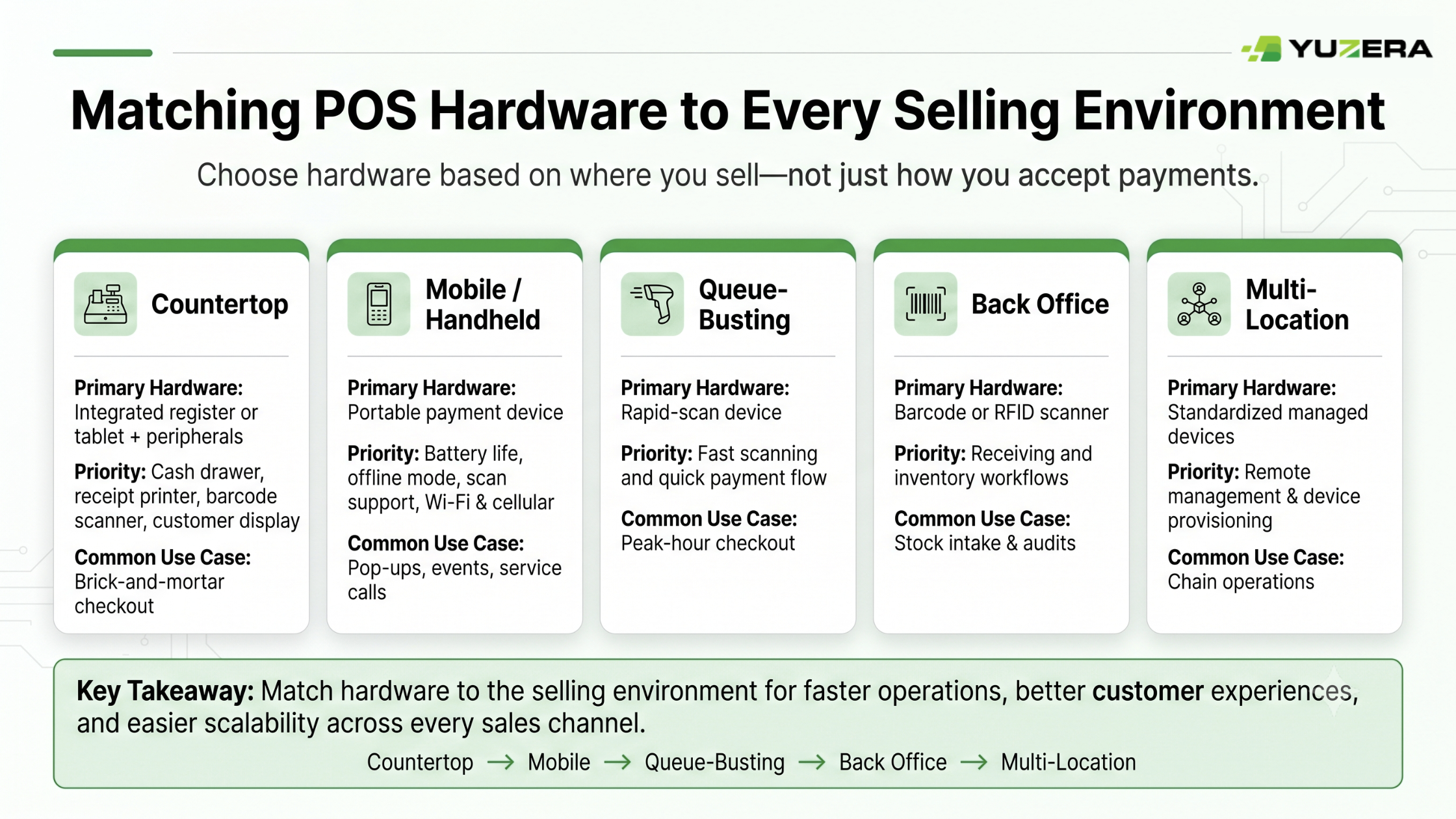
Matching hardware to each selling environment starts with mapping where a business sells before choosing what to buy. A countertop station, a mobile handheld, and an e-commerce checkout each demand different capabilities, and a POS setup that works everywhere allows merchants to mix them without changing platforms.
Here is a practical way to compare hardware across the environments most merchants operate in:
| Selling Environment | Primary Hardware | What to Prioritize | Common Use Case |
|---|---|---|---|
| Countertop | Integrated register or tablet plus peripheral stack | Cash drawer, receipt printer, barcode scanner, customer display | Brick-and-mortar checkout |
| Mobile / handheld | Untethered device with card acceptance | Battery life, drop rating, offline mode, scan support, Wi-Fi and cellular | Pop-ups, events, service calls, line-busting |
| Semi-attended / queue-busting | Rapid-scan device | Fast item scan and tender flow, tethered or untethered | Peak-hour line reduction |
| Back office / receiving | Barcode or RFID scanner | Receiving and putaway workflows | Stock intake and audits |
| Multi-location | Standardized, remotely managed devices | Device provisioning, remote management, role-based access | Chain and enterprise operations |
Mobility has moved from nice-to-have to baseline. Tap to Phone grew 200% year over year worldwide (Visa), which means accepting a payment on a phone at a market stall or on a service call is now something customers expect. When evaluating hardware, merchants should decide which peripherals are required versus optional for their actual workflow. A jewelry counter needs a customer display; a mobile detailer does not.
Yuzera offers proprietary terminals and accessories built to run the same software across these environments, so the terminals at the counter and the accessories in a mobile kit report into one system. That consistency is the point of hardware that works everywhere, ensuring a foundation for scalable payments.
What Does Real Inventory Sync Actually Require?
Real inventory sync requires one canonical record of every product and a live ledger of what is on hand, reserved, and available to promise across all channels. Without it, on-hand counts drift from reality, and that drift costs sales directly.
The scale of the problem is larger than most owners assume. In one study of a UK grocery retailer spanning 11 stores and more than 24,000 SKUs, roughly 65% of SKUs suffered from inventory record inaccuracy. A full inventory audit at a test store produced an 11% increase in store-wide sales over the following two months compared to a control store (ECR Retail Loss). Accurate inventory is not housekeeping. It is revenue otherwise left on the shelf.
True inventory sync rests on a handful of requirements that can serve as evaluation checkpoints:
- Single item master. One SKU and variant identity used across POS, e-commerce, and every warehouse.
- Single inventory ledger. On-hand, reserved, available-to-promise, and safety stock tracked in one governed place.
- Real-time reservation logic. Prevents double-selling across channels, which is essential once pickup and ship-from-store enter the mix.
- Return-to-stock rules. Condition-based, channel-agnostic returns with fraud controls.
- Reconciliation and audit workflow. Cycle counts, exception handling, and root-cause tagging for receiving, shrink, and picking errors.
Clean product identification underpins all of it. GS1 barcodes encode identifiers like Global Trade Item Numbers used for product identification, and can also carry attributes such as batch, lot, dates, and serials (GS1). A GTIN identifies trade items that are priced, ordered, or invoiced at any point in the supply chain (GS1). Getting a barcode and GTIN strategy right early keeps a catalog from fragmenting as the business scales.
Why Does Unified Reporting Become Essential as You Grow?
Unified reporting becomes essential because once a business sells across channels, separate dashboards hide the truth about performance. If in-store and online performance live in two systems, it becomes difficult to see which products move where, how pickup orders affect store labor, or where real margin sits. One view of channel performance and inventory health is what allows owners to make decisions instead of guessing.
The market is actively fixing this. Among surveyed retailers, 80% have upgraded or are upgrading real-time order and inventory visibility across channels, and 76% are doing the same for unified pricing and promotions (TCS). These are not experimental features. They are becoming table stakes for competitive operations.
When buy-online-pickup-in-store is added, new KPIs become critical: pickup order accuracy, time-to-ready, and how reserved inventory affects available-to-promise across channels. A reporting layer that unifies SKU and channel data, supports scalable payments tracking, exports cleanly, and is ready for business intelligence tools keeps those metrics visible as an operation grows more complex.
How Do You Know a POS Will Scale With You?
A POS will scale when its architecture already supports the channels, locations, and workflows a business plans to add, not just the ones it runs today. The wrong question is “does it work now?” The right question is “will it still work when locations double and ship-from-store is added?” Scalable payments and scalable operations both depend on that foresight.
There are a few common approaches to structuring a cross-channel system, and each fits a different stage:
| Approach | How It Works | Best Fit |
|---|---|---|
| Single-platform unified commerce | POS, e-commerce, inventory, and reporting in one platform | Merchants who want one system and one source of truth |
| Composable / best-of-breed | POS plus separate e-commerce plus a connecting inventory or OMS layer | Teams with specialized needs and technical resources |
| API-first orchestration layer | POS and e-commerce act as front ends while orchestration unifies customer, order, and inventory data | Businesses unifying multiple existing systems |
| Multi-location / enterprise pattern | Store systems plus centralized inventory and OMS with strong governance | Chains and larger merchants needing roles and auditability |
A scalability checklist helps pressure-test any option: channels supported now and later, including in-store, mobile, online, pickup, ship-from-store, phone orders, and invoices; multi-location controls like per-location tax rules, catalogs, and employee roles; catalog scale for variants, bundles, and serialized items; inventory logic for available-to-promise, partial fulfillments, and split shipments; returns for cross-channel and return-anywhere support; and reporting for unified data and export or API access.
Yuzera positions itself as a turnkey omni-solutions provider with proprietary POS software and hardware, payment orchestration, and value-added services, backed by the track record of parent company Digitech. That orchestration layer is what allows a business to grow from one counter to many without swapping platforms partway through. The face-to-face solutions and e-commerce gateways connect on the same foundation, and more information is available about the company.
What Security Work Increases When You Add E-Commerce?
Security work increases when e-commerce is added because an online checkout introduces a new threat surface that a physical counter does not have. Payment pages and the scripts that run on them are a known target, and PCI DSS v4.0 added new requirements specifically to address e-commerce threat trends (PCI Security Standards Council). If a business sells online, script governance and third-party tag management move from optional to required.
The compliance calendar matters here. PCI’s Summary of Changes states that new requirements in PCI DSS v4.0 were either effective immediately or treated as best practices until 31 March 2025, after which they became effective (PCI Security Standards Council). PCI also published guidance on how certain superseded v4.x requirements should be reported after that date, reinforcing 31 March 2025 as a firm boundary (PCI SSC FAQ). Merchants that added or plan to add online checkout should treat those future-dated requirements as current requirements.
For a broader governance baseline, the NIST Cybersecurity Framework 2.0, published February 26, 2024, offers a taxonomy of high-level cybersecurity outcomes usable by any organization, and it deliberately does not prescribe how to achieve them (NIST). It gives merchants a structure for talking about security without drowning in technical detail.
One caution: this is not legal advice. Whether a specific architecture reduces PCI scope or an integration pattern is compliant depends on how cardholder data flows through a given system. Merchants should review their configuration with a qualified security assessor or their acquirer’s program requirements before making claims either way.
The Step-by-Step POS Selection Checklist
Use this sequence to choose a POS setup that holds up across channels and over time.
- Map channels and fulfillment promises. List in-store, ship, buy-online-pickup-in-store, ship-from-store, and returns-anywhere. Workflows that are not named cannot be planned for.
- Define an inventory truth model. Decide on a single ledger versus multiple, and specify reservations and safety stock rules.
- Audit catalog foundations. Set SKU and variant rules, choose a barcode and GTIN strategy, and define bundles before migrating anything to ensure smooth retail integration.
- List must-have workflows by role. Cashier, manager, receiver, picker or packer, and accountant each need specific functions. Write them down.
- Run a hardware fit test by environment. Test at the counter, in the aisle, at curbside staging, and in a pop-up or mobile setting.
- Demand integration proof. Require a live demonstration of real-time or defined-latency inventory sync across POS, e-commerce, and inventory, including how the system handles conflicts.
- Demand reporting proof. Require one unified view for channel performance and inventory health, not two separate dashboards.
- Complete a security and compliance review. Cover PCI scope, access control, logging, vulnerability scanning cadence, scalable payments security, and payment page script governance for e-commerce.
- Pilot, then roll out. Start with one or two locations and one online storefront. Validate inventory accuracy and returns before scaling further.
Working this checklist in order helps merchants avoid buying a system that demos well but breaks under real omnichannel load.
FAQ
Q1) What is the best omnichannel pos for Canadian small businesses?
The best omnichannel POS is one where in-store, mobile and online sales run through a single system, so stock levels and reporting stay in step across every channel. For a small business that matters most in three places: inventory that updates in real time, so you don’t sell the same item twice; one set of sales figures instead of three; and support for fulfilment options like in-store pickup. Look for a setup that can take on a second location or a new channel without replacing what you already have. Yuzera provides POS and commerce solutions to merchants across Canada, in English and French.
Q2) How to sell in store and online with one system?
A POS setup with an integrated online checkout connects your in-store terminal and your website to the same underlying system, so sales and stock update together no matter where a purchase happens. That connection is what gives you a single product catalogue and a single inventory count across both channels. Without it, your shop and your website run as two separate businesses that happen to share a name — two sets of stock figures, two sets of numbers to reconcile at the end of the day.
Q3) How to determine the best POS system for small businesses Canada?
Start with how stock is tracked. A POS that handles cross-channel selling keeps one product list and one live inventory count, showing what’s on hand, what’s reserved and what’s genuinely available to sell. That reservation step is what stops the same item being sold twice when someone buys online and someone else picks it up in store. From there, look at whether the system reports both channels together, whether it supports the fulfilment options you offer, and whether it can take on a second location without being replaced. Yuzera provides POS and commerce solutions to merchants across Canada, in English and French.
Q4) What makes a unified commerce for Canadian retailers worth the switch?
An integrated payment solution for retail is worth the switch when it turns separate systems into one operation a business can actually manage and grow. Only 3% of retailers currently provide a truly unified experience (TCS), and connected shoppers spend 1.5x more per month than single-channel shoppers (Deloitte Insights). True retail integration is what allows merchants to capture that higher-value behavior instead of losing it to disconnected tools.
Q5) Should a business choose a POS system with inventory management in Canada?
Choosing a payment processor with inventory management built in makes sense for merchants who want one source of truth rather than a stack of connected tools to maintain. A built-in approach keeps catalog, stock ledger, and reporting aligned automatically, which matters more as channels and locations are added. If an operation is highly specialized, a composable approach may fit better, but for most growing merchants a unified system reduces the risk of drift between channels.
Works Cited
- U.S. Census Bureau. “Quarterly Retail E-Commerce Sales.”
- Federal Reserve Bank of St. Louis. “E-Commerce Retail Sales as a Percent of Total Sales (ECOMPCTNSA).”
- Statistics Canada. “Retail Trade, December 2025.”
- Statistics Canada. “Retail Trade Sales by Province and Territory (Table 20-10-0056-03).”
- Adobe. “2024 US ADI Report (Adobe Quarterly Report).”
- Adobe. “2024 Holiday Shopping Season Recap.”
- Deloitte Insights. “2025 Retail Industry Outlook.”
- Mastercard. “Unified Commerce Basics.”
- TCS. “Unified Commerce for Modern Customer Journeys.”
- ECR Retail Loss. “Fixing Broken Inventory: Inventory Records Increases Sales by Eleven Percent.”
- GS1. “Barcodes.”
- GS1. “GTIN (Global Trade Item Number).”
- Visa. “Visa Tap to Phone Adoption Soars.”
- PCI Security Standards Council. “PCI DSS v3.2.1 to v4.0 Summary of Changes.”
- PCI Security Standards Council. “SAQs for PCI DSS v4.0.1 Bulletin.”
- PCI Security Standards Council. “FAQ 1593.”
- PCI Security Standards Council. “E-commerce Threat Trends and PCI DSS v4.0.”
- NIST. “NIST Cybersecurity Framework (CSF) 2.0.”